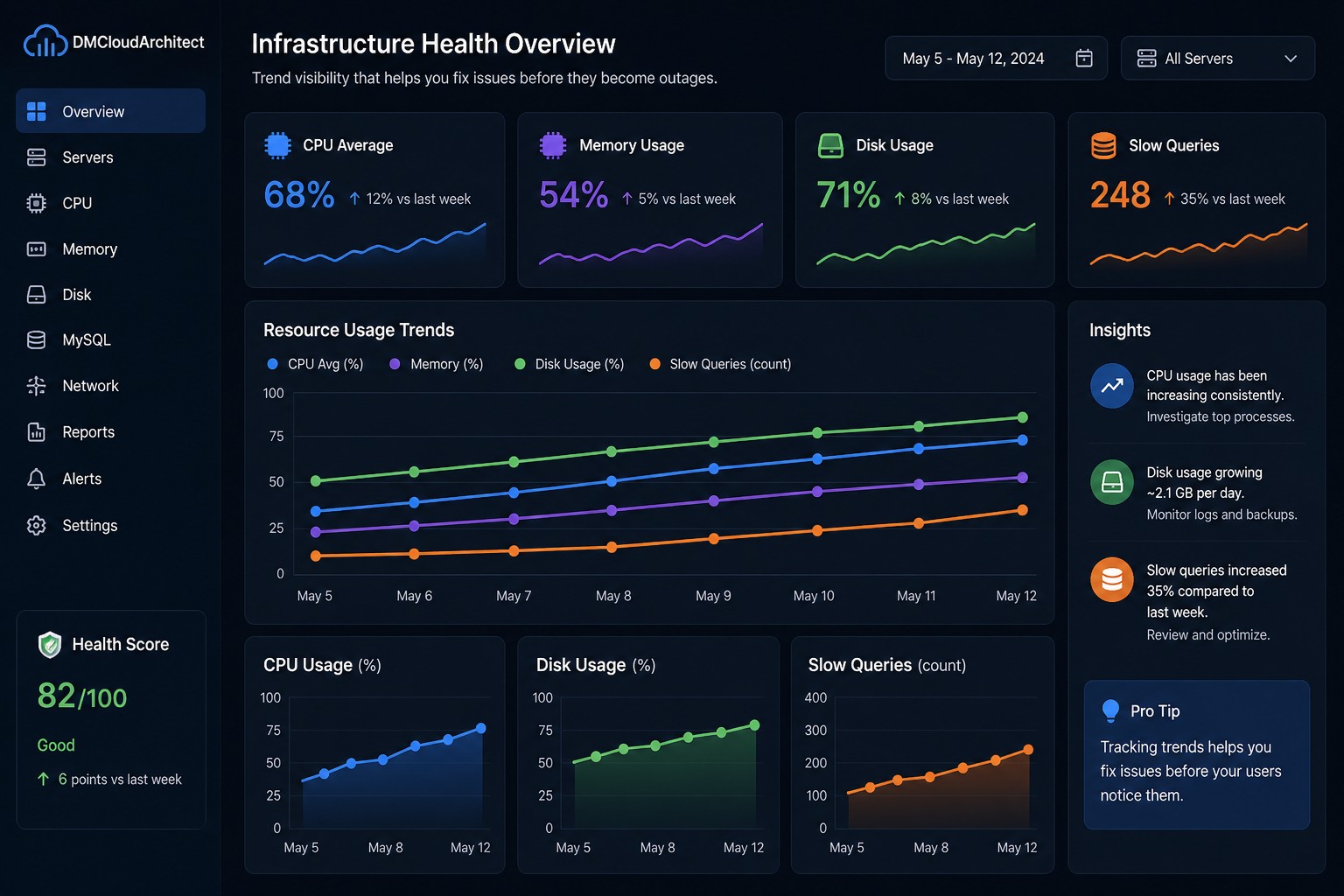
Disk space rarely fails all at once. It grows quietly, day by day, until one morning your application crashes or your database refuses to write. If you’ve ever been surprised by a full disk, you already know the real issue isn’t disk space—it’s visibility.
This is where understanding a disk growth trend linux environment becomes critical. Instead of reacting to alerts at 95% usage, you start seeing how storage evolves over time—and more importantly, when it’s heading toward trouble.
Why Disk Growth Trends Matter
Most monitoring tools focus on thresholds. They tell you when disk usage crosses a limit, but not how it got there. That’s a problem.
Here’s the thing… a disk filling up is usually not a sudden event. It behaves more like a slow leak:
- Logs growing steadily every day
- Backups accumulating without cleanup
- Temporary files never being purged
- Database tables expanding gradually
If you only look at current usage, you miss the story behind it. But when you analyze disk usage trends linux server environments over time, patterns become obvious.
What a Disk Growth Trend Actually Shows
Tracking disk space usage over time server systems gives you more than just numbers—it gives you direction.
For example, instead of seeing:
- Disk usage: 78%
You start seeing:
- +2% growth per day
- Acceleration during weekends
- Sudden jumps tied to batch jobs
But this is where it matters… once you understand the rate of growth, you can predict when you’ll run out of space.
How to Track Disk Growth on Linux
There are a few practical ways to monitor disk growth linux systems without overcomplicating your setup.
1. Simple Daily Snapshots
You can start with a lightweight approach by recording disk usage periodically:
df -h >> /var/log/disk-usage.logRun this via cron daily. Over time, you’ll build a raw history.
2. Structured Tracking with Timestamps
A slightly better approach includes timestamps for easier analysis:
echo "$(date) $(df -h / | tail -1)" >> /var/log/disk-growth.logThis lets you track disk growth linux systems in a format that can be parsed later.
3. Use Metrics Tools (But Keep It Simple)
Tools like collectd, node_exporter, or lightweight scripts can store disk metrics over time. The goal isn’t complexity—it’s consistency.
You don’t need a massive observability stack. You just need a reliable way to build disk usage history linux environments can depend on.
Real-World Example: The Slow Log Problem
Let’s say you’re running a MySQL server. Everything looks fine—until disk usage suddenly jumps from 70% to 95%.
Without history, it feels random.
But with disk usage trends linux server data, you might see:
- Slow query logs growing 500MB per day
- No log rotation configured
- Growth accelerating after a deployment
So what does this mean in practice?
You could have predicted the issue weeks earlier—and fixed it with a simple log rotation policy.
Turning Trends Into Action
Tracking data is useful, but acting on it is what makes the difference.
Here’s how to use disk growth insights effectively:
- Set growth-based alerts: Alert when growth rate spikes, not just when space is low
- Identify abnormal patterns: Sudden changes often point to misconfigurations
- Forecast capacity: Estimate when disks will fill up
- Plan upgrades early: Avoid emergency scaling
This shifts your mindset from reactive to proactive.
Why Most Teams Miss This
Most monitoring setups are designed for uptime, not insight.
They answer:
- Is the system up?
- Is disk usage above 90%?
But they don’t answer:
- How fast is disk growing?
- When will it become a problem?
- What changed over time?
That gap is exactly where disk growth trend linux analysis becomes valuable.
Summary
Disk issues are rarely surprises—they’re just unnoticed trends. When you start tracking disk usage over time, small patterns become early warnings instead of late-stage emergencies.
If you want a clearer, trend-focused view of your systems without adding more alert noise, take a look at Infrastructure Health Reporting. It’s designed to show how your infrastructure evolves—so you can fix problems before they turn into outages.