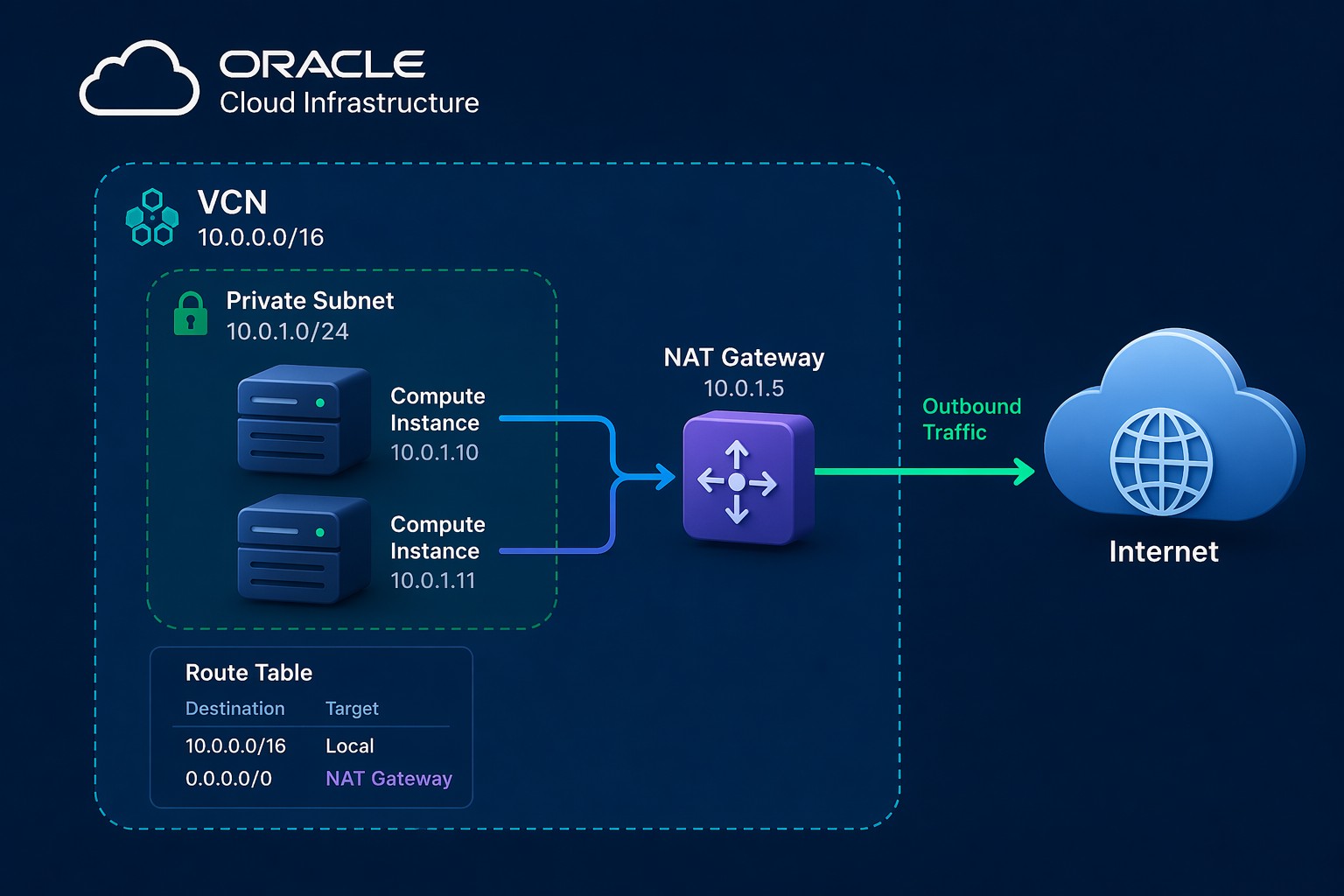
Getting started with Oracle Cloud Infrastructure (OCI) can feel overwhelming at first. You log in, see dozens of services, and suddenly you’re expected to design networks, launch servers, and secure everything correctly. Without a clear path, it’s easy to make early mistakes that are hard to fix later.
This Oracle Cloud Infrastructure tutorial walks through the practical foundation you need. Instead of focusing on theory, we’ll cover what actually matters when you’re building your first working environment.
Why Getting the Foundation Right Matters
OCI is powerful, but it’s also very structured. Decisions you make early—like how you design your Virtual Cloud Network (VCN) or segment subnets—affect security, scalability, and long-term maintenance.
Here’s the thing: most issues in cloud environments aren’t caused by the application. They come from poor networking, weak access control, or unclear architecture.
- Incorrect CIDR ranges can block future expansion
- Improper routing can expose systems unintentionally
- Missing segmentation increases security risk
So before launching instances, you need a simple, solid structure.
OCI Core Concepts You Need to Understand
Before jumping into setup, make sure these building blocks are clear:
Compartments
Compartments organize resources. Think of them as logical folders for separating environments like dev, test, and production.
Virtual Cloud Network (VCN)
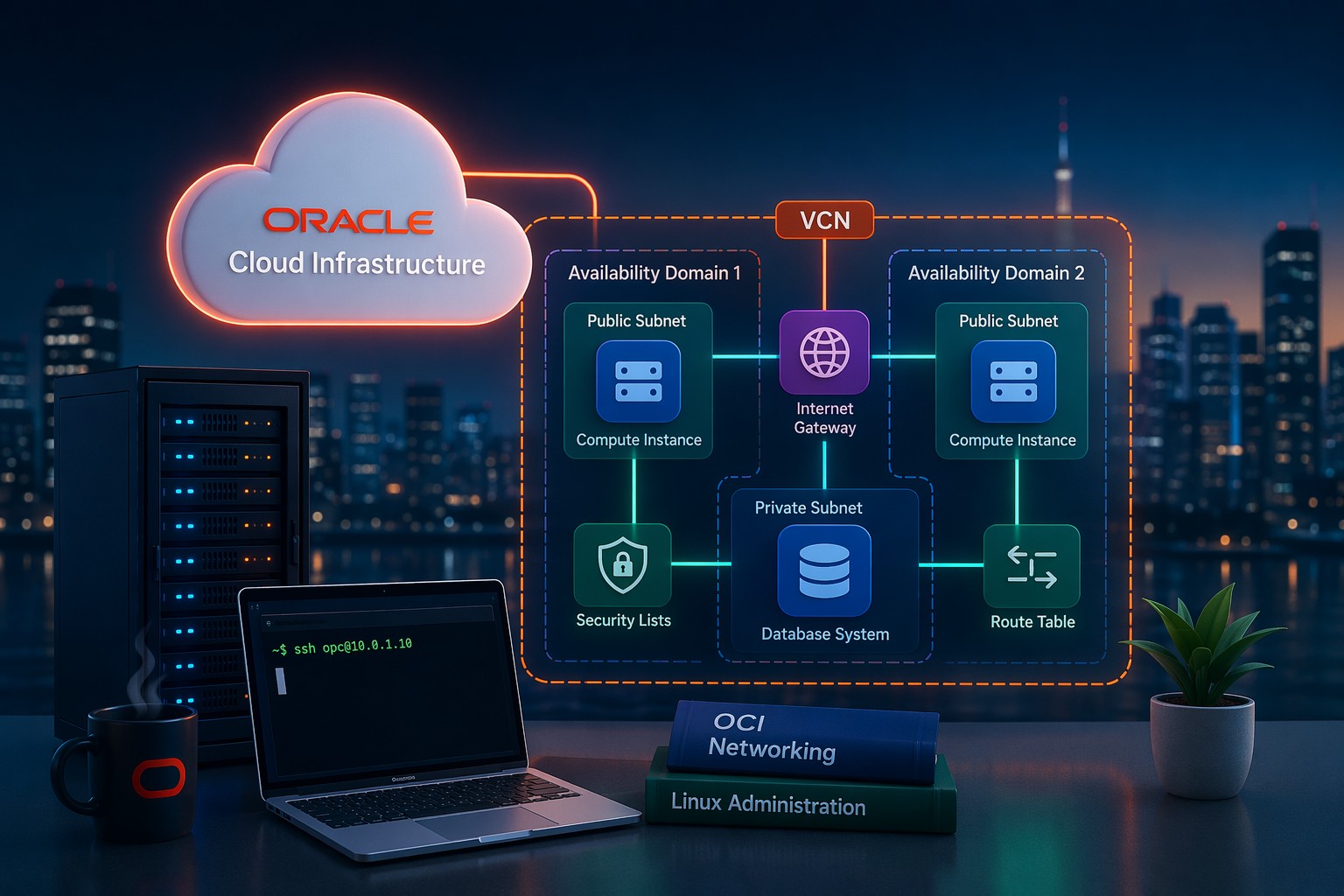
This is your private network in OCI. You define IP ranges and control how traffic flows inside and outside your environment.
Subnets
Subnets divide your VCN into smaller segments. Typically:
- Public subnet for internet-facing resources
- Private subnet for internal systems
Gateways
Gateways control external connectivity:
- Internet Gateway for public access
- NAT Gateway for outbound-only traffic
- Service Gateway for Oracle services
Oracle Cloud Infrastructure Step-by-Step Setup
This is a simplified OCI setup guide you can follow even if you’re using the free tier.
Step 1: Create a Compartment
Start by creating a dedicated compartment for your project. This keeps resources organized and avoids confusion later.
Step 2: Create a VCN
Define a CIDR block, for example:
10.0.0.0/16This gives you enough space for multiple subnets.
Step 3: Create Subnets
Split your network into at least two subnets:
- Public subnet (e.g., 10.0.1.0/24)
- Private subnet (e.g., 10.0.2.0/24)
Attach route tables appropriately so public subnets use an Internet Gateway, while private subnets use a NAT Gateway.
Step 4: Configure Security Lists or NSGs
Define inbound and outbound rules. For example:
- Allow SSH (port 22) from your IP only
- Allow HTTP/HTTPS for web servers
Avoid opening everything to 0.0.0.0/0 unless absolutely necessary.
Step 5: Launch a Compute Instance
Create a Linux instance inside your subnet. Attach it to the correct network and assign a public IP only if required.
Step 6: Test Connectivity
Verify:
- SSH access works
- Outbound internet access works (from private subnet via NAT)
- Firewall rules behave as expected
Real-World Example: Simple Web App Setup
Let’s say you’re deploying a basic web application:
- Web server in a public subnet
- Database server in a private subnet
The web server handles incoming traffic, while the database remains isolated. Only internal traffic is allowed between them.
This design reduces exposure and follows a clean separation model that scales well as your environment grows.
Common Mistakes to Avoid
- Using overly small CIDR ranges
- Placing databases in public subnets
- Overly permissive security rules
- Skipping compartment structure
- Not planning for future scaling
But this is where it matters: fixing these later often requires rebuilding parts of your environment.
When to Get Help
If you’re building something beyond a simple test environment—like production workloads or multi-tier applications—it’s worth getting your architecture reviewed early.
A small adjustment in network design or security configuration can save hours of troubleshooting later.
Summary
This Oracle Cloud Infrastructure tutorial gives you a practical starting point: organize with compartments, design your VCN carefully, separate subnets, and control traffic with gateways and security rules.
Once this foundation is in place, everything else—compute, databases, scaling—becomes much easier to manage.
If you want help designing or reviewing your OCI setup before it grows complex, you can Get OCI setup and ongoing support and build your environment with confidence.