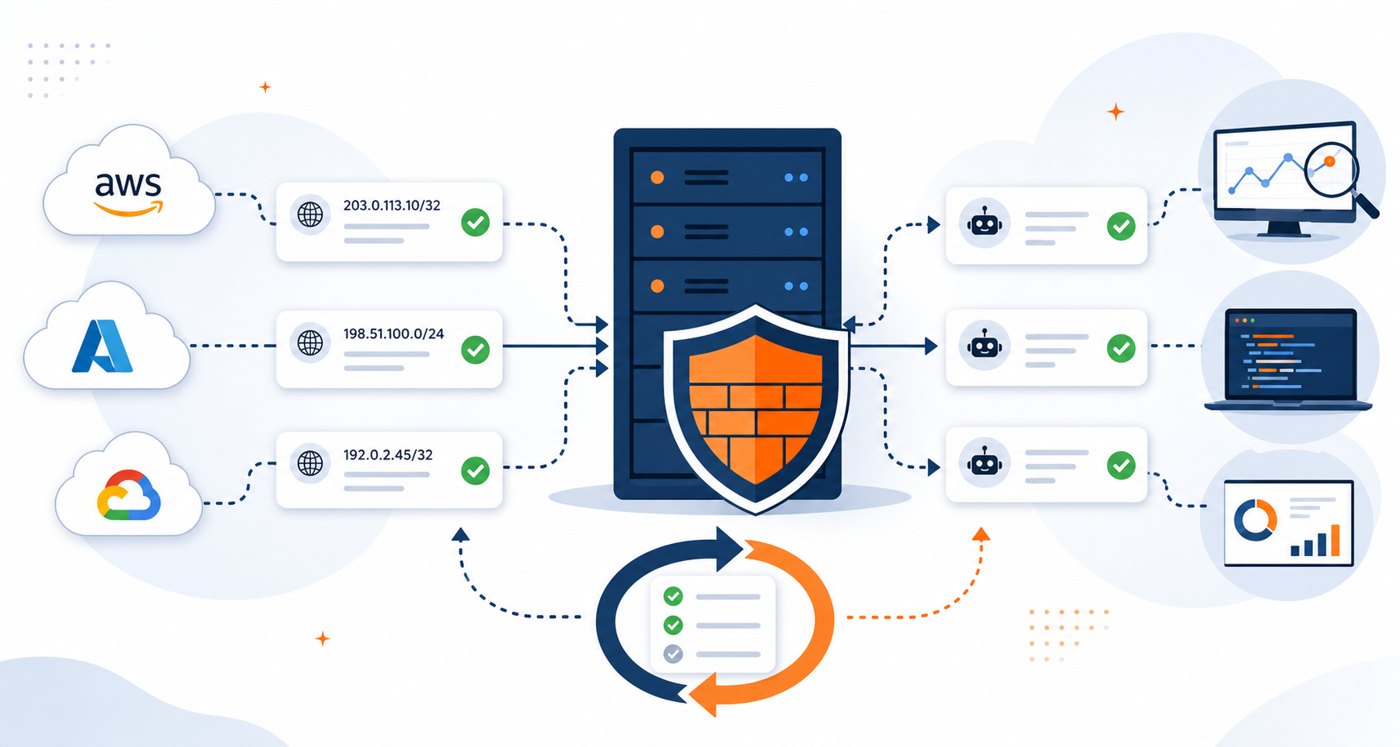
Allow lists are supposed to make servers safer, but they become risky when nobody knows how the entries got there, what changed yesterday, or how to roll back a bad update. This is especially true when access rules include cloud providers, CDN ranges, uptime monitors, AI crawlers, search bots, office VPNs, and partner networks.
The practical goal is not to block every surprise by hand. The goal is to make updates predictable: trusted sources are reviewed, firewall changes are tested before they reach production, and your linux server monitoring tells you when the rules stop matching reality.
Why IP Allow Lists Drift Over Time
Cloud and bot IP ranges change because providers add regions, retire ranges, split services, and publish new JSON or text feeds. Monitoring vendors may also change probe networks. A rule that worked last month can quietly break a health check today, while an old exception can stay open long after it is needed.
For small teams, the hidden cost is attention. You may have nginx, Apache, iptables, nftables, UFW, HAProxy, Caddy, and a cloud firewall all representing slightly different versions of the same access policy. Without a review process, the allow list becomes tribal knowledge.
Start With a Clear Access Rule Inventory
Before automating updates, document what each allow list is protecting. A useful inventory does not need to be fancy. It should answer a few operational questions quickly:
- Protected service: admin panel, API endpoint, monitoring endpoint, database port, SSH bastion, or web application path.
- Allowed source: cloud provider, uptime monitor, office VPN, build system, crawler, partner, or internal subnet.
- Rule location: cloud security group, local firewall, reverse proxy config, application middleware, or load balancer.
- Business reason: why this source needs access and who owns the decision.
- Rollback path: the previous known-good config and the command or process to restore it.
This inventory makes automated IP feeds safer because each feed maps to a real purpose instead of becoming a giant pile of trusted networks.
Review the Source Before Trusting the Feed
Many teams pull provider ranges from public endpoints or community-maintained repositories. That can be perfectly reasonable, but source quality matters. Check where the data comes from, how often it updates, whether checksums or dated releases are available, and whether the project separates providers cleanly.
For production systems, prefer feeds that preserve the original provider source, publish changes clearly, and support pinned versions. If your update job can only fetch “latest” with no record of what changed, troubleshooting becomes harder when a rule suddenly blocks a customer, monitoring probe, or admin workflow.
Use Automation, But Keep a Human-Readable Diff
Automation is useful when it turns repetitive work into a predictable change. It is dangerous when it hides the change. Each scheduled update should produce a human-readable summary that shows added ranges, removed ranges, affected services, and the rule files that changed.
For example, a daily allow list update might generate:
- one diff for provider source data, such as new or removed CIDR blocks;
- one diff for rendered server config files;
- a validation result for each target system;
- a backup path for the last deployed configuration;
- a short note explaining whether production was changed or held for review.
That summary can be posted to a ticket, saved as a build artifact, or included in a weekly infrastructure report. The important part is that the team can see what changed without digging through raw JSON at 2 AM.
Validate Configs Before Reloading Services
Every firewall or proxy update should pass a local validation step before the service reloads. The exact command depends on the tool, but the pattern is consistent: render the config, test syntax, stage it atomically, reload safely, and confirm the service is still healthy.
- nginx: run a config test before reload and avoid overwriting the only known-good file.
- Apache: validate syntax before restarting or reloading the service.
- iptables or nftables: use restore/test patterns where available and keep an automatic rollback timer for remote systems.
- UFW: confirm the resulting rules still allow your management path before applying broad changes.
- HAProxy or Caddy: validate generated config and check listener health after reload.
The most important rule is simple: never let an unattended IP update be the reason you lock yourself out of a production server.
Protect SSH and Admin Access Separately
SSH and admin panels deserve stricter handling than public web traffic. Do not mix crawler allow lists, cloud provider ranges, and emergency management access in one broad rule. Keep a separate management access policy, preferably with VPN, bastion, identity controls, or just-in-time access.
If an automation tool can change SSH-related firewall rules, add extra safety checks. Confirm the current session source remains allowed, keep a rollback timer active, and alert the team if the management policy changes. This is one area where “fully automatic” should still mean “automatic with guardrails.”
Watch for Three Failure Modes
A healthy allow list process looks for more than syntax errors. It checks whether the operational outcome still makes sense. Three failures are especially common:
- Trusted access breaks: uptime checks, webhooks, admin workflows, or partner integrations start failing because a required range was removed.
- Overly broad access appears: a provider-level range is allowed when the service only needed a narrow monitoring source.
- Rules diverge across layers: cloud firewalls, local firewalls, and reverse proxies disagree, making incidents harder to diagnose.
Good linux server monitoring should surface these issues through failed health checks, unexpected connection patterns, service reload errors, and configuration drift indicators.
A Practical Maintenance Checklist
Use this checklist when you introduce or review automated cloud and bot IP allow list updates:
- Document each allow list by service, owner, source, and business purpose.
- Use provider feeds or repositories that publish clear source data and change history.
- Generate readable diffs before applying changes.
- Validate every rendered config before reload.
- Keep a tested rollback path for each server or proxy.
- Protect SSH and admin access with separate, stricter rules.
- Log the deployed version of each feed or generated config.
- Monitor the services that depend on those rules, including uptime checks and webhooks.
- Review stale exceptions monthly so old access does not live forever.
When Weekly Reports Beat Another Dashboard
Dashboards are helpful during an incident, but they are easy to ignore during normal weeks. A weekly infrastructure health report can summarize the signals that matter: firewall reload failures, failed uptime checks, unexpected service exposure, disk or CPU pressure, and configuration changes that deserve a second look.
That rhythm is useful for small business owners and lean developer teams because it turns maintenance into a habit. Instead of waiting for an outage, you get a regular prompt to ask, “Did our access rules change, and are they still doing what we expect?”
Summary
Cloud and bot IP allow lists are most effective when they are treated as living infrastructure, not one-time firewall notes. Automate the boring parts, but keep clear ownership, readable diffs, validation, rollback, and monitoring around every change. That balance lets you keep trusted services working without turning server access rules into a silent production risk.
If you want a simple weekly view of server health, access-rule risks, and monitoring signals, use Get the free starter plan for weekly infrastructure health reports and catch small infrastructure issues before they become urgent.