Oracle Cloud MySQL setup is easier when you treat it as a small infrastructure project, not only a database provisioning task. The database system may be created in a few minutes, but the surrounding decisions determine whether the environment is secure, maintainable, and ready for real application traffic.
For small teams, the challenge is usually not knowing every OCI feature. The challenge is knowing which setup decisions matter before launch. A good checklist helps you slow down just enough to avoid risky defaults, unclear access paths, and operational surprises later.
This guide gives you a practical OCI MySQL HeatWave setup checklist you can use before creating the database, during the initial deployment, and after the first connectivity test. It is written for small businesses, solo builders, and infrastructure teams that want a clean starting point instead of a fragile demo.
1. Confirm the Workload and Deployment Goal
Before you create a MySQL DB system in OCI, define what the database is supposed to support. A development sandbox, a customer-facing application, a reporting workload, and a production business system all need different choices.
Start with a simple statement: who connects to the database, from where, how important the data is, and what recovery expectation the business has. This will guide subnet placement, backup retention, shape selection, and monitoring expectations.
- Is this a production database or a learning environment?
- Will application servers connect privately inside a VCN?
- Does the workload need MySQL HeatWave analytics features immediately?
- What is the acceptable downtime or data loss if something fails?
- Who owns database changes after launch?
If those answers are unclear, pause before provisioning. The database wizard cannot fix an unclear operating model.
2. Design the Network Before the Database
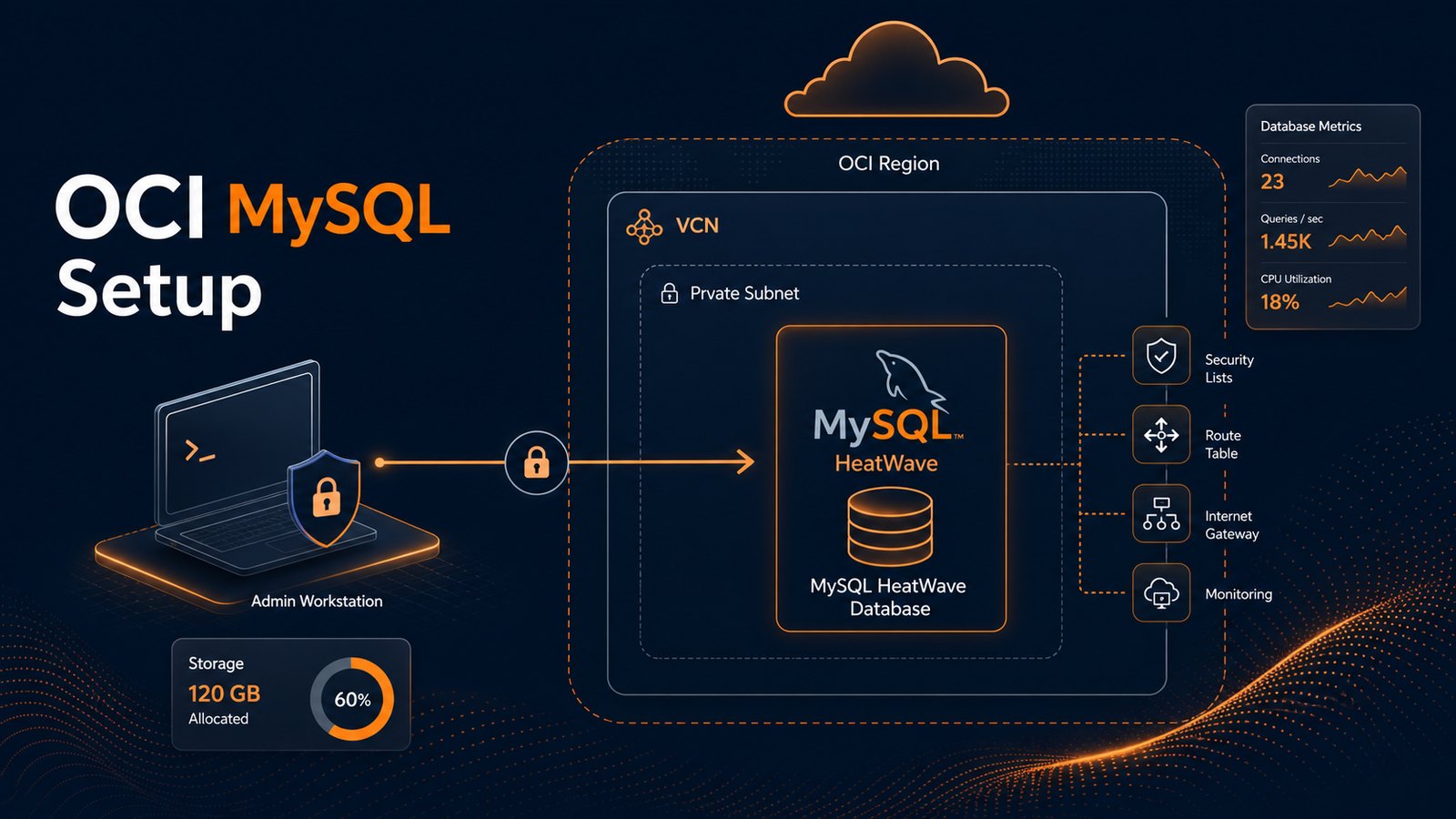
The network is the foundation of Oracle Cloud MySQL setup. For a production-style deployment, the database should usually live in a private subnet. Application servers, bastion hosts, or controlled services should be the only systems allowed to reach MySQL.
A common mistake is opening port 3306 broadly during testing and forgetting to tighten it later. That may make early troubleshooting easier, but it creates an unnecessary security risk. Instead, use narrow rules from the beginning.
For many small teams, Network Security Groups are easier to manage than broad subnet security lists. You can create one NSG for the application tier and one for the database tier, then allow MySQL traffic only from the application NSG to the database NSG.
3. Choose the Shape, Storage, and Backup Settings Deliberately
OCI makes it easy to pick a small database shape and move forward, but production systems need some headroom. Consider current workload, expected growth, connection count, backup windows, and whether analytics processing may be added later.
If you are following an OCI MySQL HeatWave tutorial, separate the basic MySQL setup from the HeatWave-specific options. HeatWave can be valuable for analytics workloads, but not every application needs that capability on day one. It is better to understand the use case than to enable features only because they are available.
At minimum, confirm:
- The DB system is in the correct compartment and subnet.
- The shape and storage size match the first realistic workload.
- Automated backups are enabled with a useful retention period.
- The maintenance window is known and documented.
- Admin credentials are stored securely and not shared casually.
4. Test Connectivity From the Real Application Path
Do not only test connectivity from your laptop. In a proper OCI layout, your laptop may not be able to reach the private database directly, and that is often the correct design.
Test from the same place your application will connect: an application server, a bastion host, or another controlled host inside the VCN. Use the private endpoint and confirm DNS, route tables, security rules, and database credentials all line up.
mysql -h your-private-mysql-endpoint -u app_user -pIf the connection fails, troubleshoot in layers. Check the source host, destination endpoint, route table, NSG rule, security list, port 3306, user permissions, and MySQL bind/access configuration. Most early problems are caused by network path assumptions, not by MySQL itself.
5. Create Application Users Instead of Reusing Admin
The administrative account should not become the default application account. Create a dedicated application user with only the permissions the application needs. This makes audits easier and reduces risk if application credentials are exposed.
For teams managing multiple applications, create separate users for each workload. Avoid one shared user across reporting jobs, web applications, and manual maintenance scripts. Separation makes troubleshooting and access reviews much cleaner.
6. Validate Backups With a Restore Mindset
Enabling backups is not the same as being ready to restore. Your checklist should include backup retention, restore ownership, and at least a basic restore test. Even a small test can reveal missing permissions, unclear steps, or unrealistic recovery assumptions.
Write down the restore procedure while the setup is fresh. Include where backups are visible, who can start a restore, how application traffic would be redirected, and how restored data would be validated.
7. Add Simple Operational Checks
After the database is online, the work is not finished. A small set of recurring checks can prevent surprises. You do not need to start with a complicated monitoring stack; you need reliable visibility into the signals that matter.
- Storage growth and free space trend
- CPU and memory pressure
- Connection usage and failed connection attempts
- Slow queries and query latency trend
- Backup success and retention
- User and permission review
These checks are especially useful for small teams because they turn database maintenance into a routine instead of a surprise project during an outage.
Summary
A strong Oracle Cloud MySQL setup starts with clear design decisions: private networking, narrow access rules, right-sized resources, tested backups, dedicated users, and simple operational checks. MySQL HeatWave can add powerful analytics capabilities, but the foundation still matters first.
Use this checklist before launch and again after your first application connection test. It will help you avoid the most common mistakes and give your team a database environment that is easier to secure, support, and improve over time.
Want weekly infrastructure health checks without dashboard fatigue?
DMCloud Architect sends Linux and MySQL infrastructure health reports directly to your inbox, so you can spot risks early without adding another monitoring dashboard to watch.
Get the free starter plan for weekly infrastructure health reports.